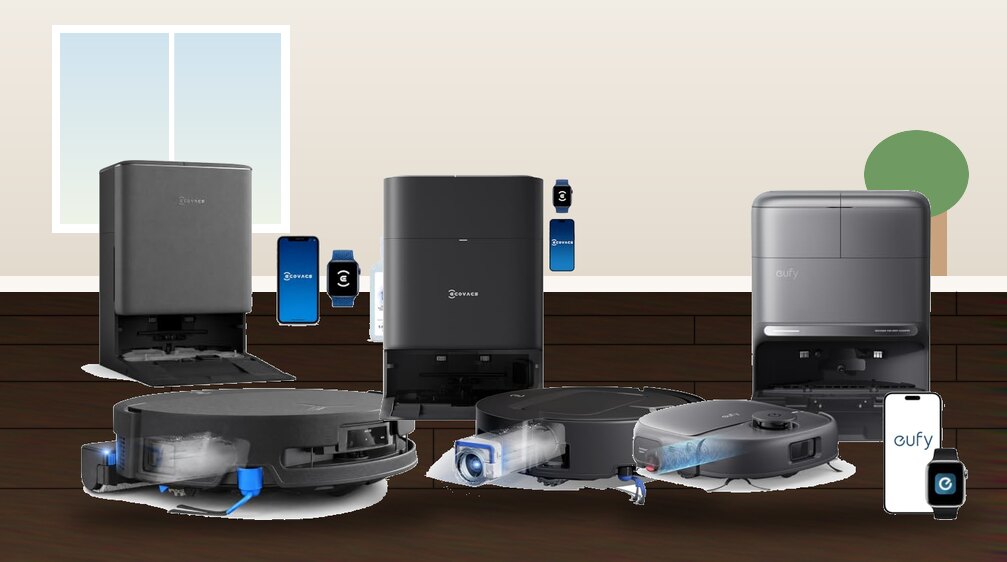
Are Robot Vacuums Worth It? For many homeowners, the answer is yes. Today’s robot vacuums are far more capable than the early models that often struggled to clean effectively. Many now feature powerful suction, smart navigation, app-based controls, and self-emptying docks that can handle much of the day-to-day floor cleaning with minimal effort from you.
That said, a robot vacuum is not the right solution for every home. Its value depends on factors such as your floor type, household size, budget, and cleaning expectations. For busy families, pet owners, and anyone looking to reduce routine chores, a robot vacuum can be a worthwhile investment that saves both time and effort. In this guide, we’ll take a closer look at the advantages, drawbacks, costs, and real-world performance of robot vacuums to help you decide whether they’re worth buying.


How robot vacuums work and the features that matter
We break down the fundamental components and technologies that determine a robot vacuum’s capability. Understanding these pieces helps us prioritize the features that will actually improve daily life, not just look good on a spec sheet.
Suction, brush systems, and what they actually do
Suction is often quoted in Pascals (Pa) or airflow watts; higher numbers generally mean better pickup, especially on carpet. But brushing matters just as much: rotating rollers agitate fibers, side brushes sweep edges, and tangle‑resistant designs (rubber combs or segmented bristles) reduce hair wrap. For homes with pets, prioritize strong suction plus a tangle-resistant roller and a larger bin — otherwise you’ll be emptying mid-week.
Filtration and bin capacity
HEPA-class filters trap fine dust and allergens; basic foam or paper filters do not. If anyone in the house has allergies, HEPA or high-efficiency mechanical filtration is a must. Bin capacity determines how often we manually empty: small bins (~300–400 mL) are fine for single-person households, but families or pet owners want 600 mL+ or an auto-empty base that dumps into a larger bag. You don’t have to spend much, since a budget robot vacuum with mapping covers the basics well.
Looking for a model to buy? Explore our roundup of robot vacuum cleaners worth considering.
Navigation and perception: random vs. smart mapping
Navigation ranges from random bump-and-go to systematic SLAM (Simultaneous Localization and Mapping) that uses LiDAR or cameras. LiDAR excels in low-light and produces accurate floor plans; camera-based systems can identify objects and obstacles. Mapping features in apps — no-go zones, room naming, and multi-floor maps — turn autonomous cleaning into a tailored routine. For multi-level homes, confirm multi-floor map support before buying.
Battery, docking, and coverage
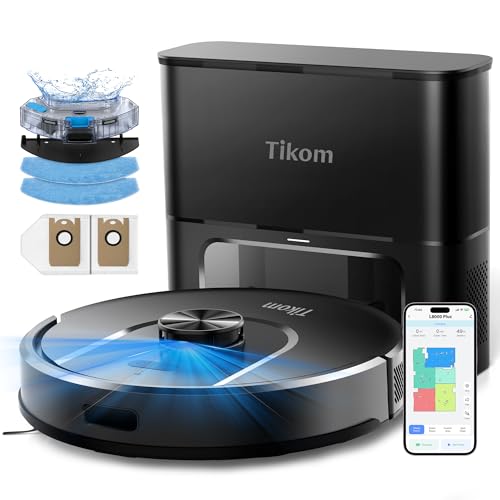
Battery capacity (mAh) and runtime (hours) translate into actionable coverage: expect 60–120 minutes for mid-tier models, which typically covers 1,000–2,000 sq ft depending on suction settings. Look at charging behavior: automatic recharge-and-resume is useful on large jobs. Auto-empty docks cost more but reduce hands-on time.
Mopping, sensors, and obstacle handling
Mopping modules vary: basic damp mops refresh hard floors while sonic or oscillating pads (seen on models like Roborock S7/S8) provide true scrubbing. Cliff sensors prevent falls down stairs; proximity and object recognition reduce collisions with cords, shoes, or pet bowls. No sensor is perfect — we still recommend clearing cables and small items from main routes. Pet owners get the most value, and our affordable robot vacuum for pet hair picks show why.
If you’re looking for a cleaner that vacuums and mops automatically, don’t miss our roundup of the robot vacuum and mop combos.
Connectivity, software, and maintenance
Wi‑Fi and voice-assistant support (Alexa/Google) add convenience. Software features like scheduling, multi-pass modes, and firmware updates materially change performance over time — regular updates can improve navigation or add features. For longevity, inspect brush access, filter replacement costs, warranty length, and how serviceable a model is (user-replaceable batteries and parts).
Practical tip: match features to real needs — pet hair? Choose high suction + auto-empty. Multi-floor house? Prioritize multi-map SLAM. In the next section we’ll take these specs into actual cleaning scenarios to show where robots truly shine and where they struggle.
Real-world cleaning performance and where robots excel or struggle
Performance by floor type
On hard floors — tile, hardwood, vinyl — most midrange robots do a very good job. They sweep and suction crumbs, pet litter, and fine dust effectively because brushes can make full contact. On low-pile carpet they still perform well; suction plus a rolling brush lifts surface debris. Once we move into medium- and high-pile carpet, results diverge: many robots lack the airflow or brush engagement to deep‑lift trapped dirt or dense pet fur. Models with higher suction and active lift or stronger brush motors (for example, higher-end Roomba or Roborock variants) handle medium pile better, but high-pile shag still often needs an upright or deep-clean session. Our robot vacuum with LiDAR guide explains laser mapping in plain terms.
What they pick up — hair, dust, and big bits
Robots are excellent at routine pickup: pet hair, cereal crumbs, dust bunnies, and daily grit. Fine dust and allergens are handled well with HEPA-class filters, but pickup efficiency depends on brush-to-floor contact and bin suction. Larger debris (pebbles, large cereal pieces) can be hit-or-miss: low-profile robots sometimes push big bits with side brushes rather than ingesting them. For heavy pet shedding, prioritize a model with a tangle-resistant brush and strong suction.
Common limitations and failure modes
Sensors, mapping, and missed spots
Good SLAM mapping reduces repeated passes and missed areas: we see fewer laps and fewer “didn’t clean” pockets with LiDAR or advanced camera systems. However, even smart mapping can be confounded by moved furniture or low-profile obstacles. Use virtual no-go zones and keep consistent room layouts to maximize coverage.
Noise, runtime, and practical tips
Noise typically ranges from ~50 dB (eco) to 70+ dB (max suction) — acceptable for daytime use but noticeable at night. Runtime (60–180 minutes) determines if a single run covers your home; on large layouts, recharge-and-resume is essential. Practical steps to improve day-to-day performance:
Practical pros and cons for different households
We present a balanced, use-case–driven look at what robot vacuums actually give you day to day. Below we highlight the practical wins most buyers notice, the regular chores and trade-offs they bring, and short profiles showing when a robot is likely to be a strong fit or only a partial solution.
Everyday benefits we see in real homes
Common drawbacks and recurring chores
Which households benefit most
Practical tip: pair a robot for daily maintenance with a periodic deep-clean session (upright or rented carpet cleaner) to cover what robots miss. In small spaces, a robot vacuum for a studio apartment keeps floors clean without taking up room.
Cost versus value: calculating return on investment
We lay out a practical way to judge whether a robot vacuum is a smart financial and lifestyle investment for our home. Below we map typical price tiers and ongoing costs, then give a simple ROI framework you can use with your own numbers.
Price tiers and what they buy you

Ongoing operating costs to budget for
Practical tip: buying third-party filters/brushes saves money; keep an extra set on hand to avoid downtime.
Simple ROI framework you can use
- Estimate hours saved per week by letting the robot do routine vacuuming (common ranges: 0.5–3 hours/week).
- Choose a notional hourly value for your time (e.g., $10–$30/hr).
- Multiply hours/week × hourly value × 52 weeks × 3 (or 5) years = monetized time saved.
- Add purchase price + estimated 3–5 year operating costs (consumables, occasional repairs).
- Compare monetized time saved to total cost.
Example: a $500 midrange robot + $200 operating over 3 years = $700. If it saves 2 hours/week and we value our time at $15/hr: 2×$15×52×3 = $4,680 — a clear monetary win. If our time value is $5/hr or savings are only 0.5 hours/week, the math looks different.
Non-monetary returns and alternatives
Don’t forget non-monetary benefits: fewer allergens, less visible pet hair, and the mental comfort of a consistently tidy floor — these can be decisive. Alternatives like a $100–$300 upright or stick vacuum give stronger deep-cleaning per dollar and lower ongoing complexity; professional cleaning ($80–$200 per visit) may beat robots for occasional deep carpet work. Choose alternatives when you have mostly high-pile carpets, very cluttered floors, or you prefer occasional deep cleans over daily maintenance. In big homes, a robot vacuum and mop for a large house saves the most time.
Next, we’ll walk through how to choose the right robot features for your layout and how to maintain one so it delivers that projected ROI.
How to choose a robot vacuum and maintain it for best results
Buying checklist: what to evaluate before you buy
We recommend running through this checklist to match a robot to your home and habits:
Interpreting specs: what really matters
Marketing numbers can be misleading—here’s how to read them:
Simple maintenance plan to keep performance high
We follow a routine that balances effort and results:
Prep tips and when to supplement with manual cleaning
Before runs, secure cords, remove small objects, and use rugs or virtual no-go zones for problem areas. Keep an extra filter and brush on hand to avoid downtime. Pair the robot with periodic manual or professional deep cleans—especially for high-pile carpets, upholstery, and allergen control—to maintain deep cleanliness between robot cycles.
Next, we synthesize these points and give a clear bottom line on whether a robot vacuum is the right choice for us. Our cheap Roomba alternatives guide shows how low the price can go.
Bottom line: is a robot vacuum the right choice for us?
We find robot vacuums are a valuable time‑saving tool when used for regular maintenance rather than as a replacement for deep cleaning. For busy households, pet owners, and homes with mostly hard floors or low‑pile carpet, convenience and daily cleaning usually justify the investment.
In contrast, if we have high‑pile carpet, heavy soiling, or multilevel layouts, a robot is a supplement but not a complete solution. Choose features that match your floors and obstacles, budget for consumables and upkeep, and integrate the robot into an overall cleaning routine.